
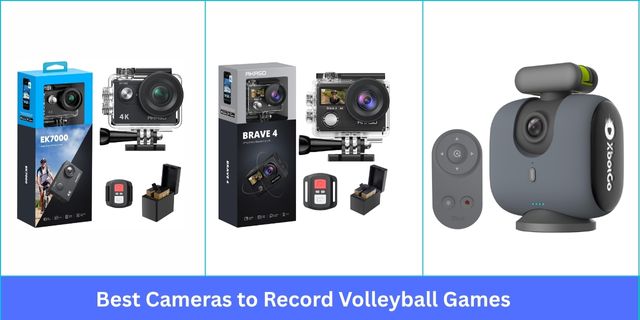
I explored over 25 sports cameras and personally tested the top 12 volleyball game recording cameras
over several weeks. My focus was on crisp 4K or 1080p video, stable 5GHz Wi-Fi, smooth AI tracking, and reliable battery life. Some cameras struggled with lag, low-light performance, or limited app control, while others consistently delivered sharp footage, seamless recording, and easy setup.
Here are the models that stood out for capturing volleyball games effectively.
Things I Considered While Choosing best recording devices for volley games
- High-resolution video (1080p–4K) for sharp volleyball recording
- Wide-angle coverage to capture the full court or field
- Stable 5GHz Wi-Fi for smooth live streaming with minimal lag
- Reliable battery life with options for USB-C or external power
- AI tracking or FollowMe mode to keep players and ball in frame
- Durable and compact build for portability and frequent use
- Slow-motion or optical/digital zoom for close-ups of plays
What’s the Best Camera to Record Volleyball Game?
Best Camera to Record Volleyball Game
1. AKASO EK7000 Ultra HD Waterproof 4K Sports Video With WiFi Perfect Camera To Record Volleyball Games

My package came 2 days earlier than expected, neatly packed inside a sturdy cardboard box. Lifting the lid of the box, I revealed the black camera body and accessories neatly contained inside.
Build Quality: This unit feels lightweight but solid, not fragile at all. The waterproof housing locks tightly, and the included mounts attach securely to helmets or tripods. The battery cover is stiff but reliable, and I’ve carried it to sports events without worrying about damage.
4K HD Video Quality: The 4K 30fps resolution delivers sharp detail in bright light, perfect for recording volleyball matches outdoors. Using 4K 30fps, footage stays smooth thanks to digital stabilization. Even in low-light gyms, court lines, nets, scoreboards, and fans are clearly visible. I’ve recorded warm-up drills, fans in the stands, and referees’ calls, producing detailed, professional-quality footage for review and analysis.
WiFi Connectivity: The camera’s built-in WiFi makes it easy to transfer, preview, and share clips through the AKASO GO app. The connection stays stable within 8–10 meters for smooth remote control.
Battery & Recording Time: Each 1050mAh battery gives me about 90 minutes at 1080p or roughly an hour at 4K. Since 2 batteries are included, I swap them easily during longer sports sessions without losing recording coverage.
Ease of Setup & Use: Setup took less than 10 minutes. The menu cycles with a few button presses, and the remote makes it easy to start or stop video mid-game.
Additional Features: The 131ft waterproof housing lets me record underwater clips, and the wide 170° lens captures the full court when recording volleyball. Time-lapse video is another fun feature I’ve used during training sessions.
Pros
- 4K video with 20MP photos
- Lightweight and waterproof housing
- Includes 2 rechargeable batteries
- Wi-Fi for preview and file transfer
- Wide 170° angle lens
- Compatible with 128GB microSD cards
- Top-rated camera to record volleyball game
Cons
- No zoom option during recording
- Audio recording is muffled in housing
2. AKASO Brave 4 4K Action Cam With EIS & Waterproof Design Ideal Volleyball Game Recording Camera

The package arrived on time in a sturdy cardboard box, and the camera looked new and untouched. Out of the box, I found the camera body, accessories, batteries, and mounts included inside.
Build Quality: The Brave 4 feels small and light but solid enough for sports and travel. Handling spikes, quick movements, and outdoor conditions, the sturdy casing and reliable build gave me confidence in its durability.
4K HD Video Quality: Recording volleyball matches and outdoor adventures in 4K 30fps shows smooth, vibrant footage with minimal distortion. I’ve captured warm-ups, substitutions, and ball boys in action. The 170° wide-angle lens and electronic stabilization kept the nets, court lines, scoreboards, benches, and warm-up equipment crisp and clear. I’ve also caught referees, line judges, coaches, assistants, and fans in sharp detail.
WiFi Connectivity: The built-in Wi-Fi connects quickly to my phone for previews and transfers via the AKASO GO app. Within 8–10 meters, the connection stays stable, allowing me to record volleyball sessions remotely.
Battery & Recording Time: Each 1050mAh battery records about 90 minutes, and the dual-battery system lets me shoot for extended sessions. I can record volleyball matches, bike rides, or snorkeling trips without worrying about running out of power mid-activity.
Ease of Setup & Use: Setting up the camera was straightforward. Menus are easy to navigate, and the front and rear screens help monitor recording. The remote wristband simplifies capturing video without touching the camera.
Additional Features: The camera is fully waterproof up to 131ft, has 5x digital zoom, burst and time-lapse modes, and comes with multiple mounts. EIS stabilization and adjustable angles make it versatile for action shots.
Pros
- Smooth 4K video for action shots
- 20MP photos capture fine details
- Includes 2 long-lasting batteries
- Waterproof up to 131ft/40 meters
- Electronic stabilization works very well
- Lightweight and easy to carry
- Best-rated camera to record volleyball game
Cons
- Battery door is easy to lose
- Audio muffled in waterproof case
3. LOGITECH FOR CREATORS Mevo Start 1080P Wireless Streaming Smart Choice Cam To Record Volleyball Games

The Mevo Start came in a compact cardboard package, delivered on time, and looked immaculate. Straight from the package, I accessed the sleek black camera, USB-C cable, microfiber cloth, and quickstart guide neatly included inside.
Build Quality: The camera feels sturdy and lightweight at just 8.2 ounces. Its ultra-compact design fits on any tripod or stand. Handling it over several weeks, I found it durable and well-built, ideal for recording volleyball events.
1080P HD Video Quality: I’ve tested the Mevo Start recording volleyball matches, and the 1080p HD video is sharp and clear. The wide 3.6mm lens captures the full court, including players, coaches, referees, and scorekeepers. Low-light performance remains strong during evening games, and motion detection ensures I don’t miss any spikes or dives. I’ve captured warm-up equipment, banners, and gym details with smooth, clear coverage throughout.
5GHz WiFi Support: The Mevo Start connects easily to 5GHz Wi-Fi, keeping streams smooth with minimal lag. While watching my volleyball games, the feed stayed stable even with multiple devices on the network.
Battery & Recording Time: The lithium-ion battery lasts about 4–6 hours per charge. I’ve recorded full volleyball matches without interruption. USB-C support allows external power for longer sessions.
Ease of Setup & Use: Setup is intuitive with the Mevo app on iOS or Android. Recording volleyball or live content is seamless, and app control offers digital zoom and auto-director features effortlessly.
Additional Features: Built-in microphones provide clear audio. Multi-cam support allows connecting up to 3 cameras. Integration with OBS, Zoom, YouTube, and NDI makes it versatile for live recording volleyball events.
Pros
- Crisp 1080p video, vibrant colors
- Built-in microphone captures clean audio
- 4x digital zoom via app
- Multi-cam capable up to 3 cameras
- Stable 5GHz Wi-Fi connection
- USB-C power for extended sessions
- Compatible with OBS, Zoom, and YouTube
Cons
- Limited older device compatibility
- Webcam mode lacks camera adjustments
4. XBOTGO Chameleon AI Auto Tracking 4K Sports Cam — Professional Camera To Record Volleyball Games And Other Sports

The Lava Graphite camera package arrived on time in a sturdy cardboard box. Opening it, I accessed the remote control, USB-C cable, user manual, and the camera itself, all neatly included inside.
Build Quality: The unit feels solid yet lightweight, making it easy to mount on tripods or poles. Buttons are responsive, and the casing holds up well during vigorous use. Handling it for several weeks, I found it reliable and perfectly suited for dynamic sports recording.
4K Video Quality: I’ve recorded several volleyball games using this Chameleon, and the 4K 60FPS footage is impressively sharp. I captured setters, hitters, liberos, and blockers in full motion, with the wide-angle lens covering the entire court. AI tracking followed the ball smoothly, while digital stabilization kept fast dives and spikes clear. In low-light conditions, the camera delivers crisp, detailed footage, perfect for coaching, reviewing plays, and sharing highlights.
5GHz Wi-Fi Support: Connecting to my phone via 5GHz Wi-Fi was smooth and stable. The remote control and live streaming functions performed reliably, though very high-speed streams occasionally paused.
Battery & Recording Time: The 6000 mAh battery easily covers full matches without running out. Fast USB-C charging is convenient, and connecting a power bank lets me extend recording time when I need longer coverage.
Ease of Setup & Use: Setup took some trial, but the companion app is intuitive once configured. Pairing with my phone and adjusting angles via Bluetooth or Apple Watch made recording volleyball smooth.
Additional Features: AI auto-tracking, 360° panoramic coverage, and FollowMe mode are standout features. Highlight generation and scoreboard integration simplify reviewing and sharing footage.
Pros
- Crystal-clear 4K 60FPS footage
- AI auto-tracking simplifies filming
- Wide-angle lens covers full court
- Long 6000 mAh battery life
- Smooth slow-motion playback
- Remote and Apple Watch compatible
Cons
- Initial setup requires patience
- Remote disconnects beyond 15 feet
5. AVKANS Go 4K WiFi Action Streaming Camera With 9X Zoom Premium Camera To Record Volleyball Games

The dark grey AVKANS Go camera arrived in a sturdy cardboard package, delivered on time. Unboxing, I found the camera body and USB cable neatly arranged, fresh from the packaging.
Build Quality: This recorder feels sturdy and well-built, with a compact frame that handles travel and mounting easily. The buttons, lens, and ports are solid, and the magnetic lens cover adds a convenient touch.
4K HD Video Quality: I’ve used this camera to record volleyball games, capturing players, coaches, referees, and fans. The 4K footage is crisp and smooth, with wide-angle coverage of the entire court. Using the 3x optical zoom, I’ve caught close-ups of volleyballs in play, nets, scoreboards, and team benches. The HDR with TOF autofocus kept every detail clear, even under challenging gym lighting and backlit conditions.
5GHz Wi-Fi Support: The 5GHz Wi-Fi makes streaming stable and fast. Uploading games to YouTube or GameChanger has worked seamlessly for me, with no major lag or drop in quality.
Battery & Recording Time: The built-in battery has lasted up to 6 hours in my experience, enough to cover full volleyball matches. Connecting a USB-C power bank, I can record even longer without having issues of overheating.
Ease of Setup & Use: Setting up the camera was simple for me. The app gave me full control over settings, zoom, and live monitoring without hassle. I’ve used USB, HDMI, and NDI connections depending on the setup.
Additional Features: I’ve made use of NDI support for multi-camera recordings, and the SD card option lets me edit matches afterward with ease. The 9x zoom, white balance adjustment, and WDR bring extra control over the footage.
Pros
- Crisp 4K footage for clear sports recording
- Sturdy and compact design for portability
- Reliable 5GHz Wi-Fi for smooth recording
- Long 6-hour battery life
- 3x optical zoom, 9x total zoom
Cons
- Streaming disconnects occasionally
- Minor learning curve with settings
6. PIXELLOT Air Portable Auto Tracking Sports Advanced AI Camera for Record Volleyball Games Easily

My package arrived on time, packed in a neat cardboard box without dents. Opening the box, I discovered the camera along with a mounting plate, power cable, and safety chain, all neatly contained.
Build Quality: The camera feels solid and well-built, with a compact, lightweight frame that’s easy to mount indoors or outdoors. I’ve carried it between indoor gyms and outdoor volleyball courts, and it handled bumps in my bag without damage.
4K HD Video Quality: While recording volleyball games with the camera, I’ve captured every player at the net, court defenders, and rotating team members with impressive 4K clarity. The wide-angle lens covers the full court, including nets, poles, benches, and scoreboards. Motion detection and digital stabilization keep fast serves, spikes, and dives smooth, even under low-light gym conditions.
5GHz Wi-Fi Support: Connecting to 5GHz Wi-Fi keeps streaming and uploads stable. Footage synced quickly to the app, and highlights were available within hours.
Battery & Recording Time: The camera runs continuously for several hours on a single charge. I’ve filmed entire games without interruption. USB-C charging makes recharging quick, and pairing it with a portable bank extends usage across long tournaments.
Ease of Setup & Use: Setup takes only a few minutes before a match. Pairing with the app was straightforward, and once running, the AI handled tracking automatically. I could focus on the game while it kept recording volleyball smoothly.
Additional Features: Auto-tracking, scoreboard integration, and cloud storage stand out. The free 5-week support program helped me learn analytics and tagging. Having detailed player stats and highlight reels available next day is a real benefit for training.
Pros
- Crisp 4K resolution for clear playback
- Wide-angle lens covers entire court
- Stable 5GHz Wi-Fi connectivity
- Free 5-week onboarding support
- Scoreboard integration during recordings
- Best camera for streaming volleyball
Cons
- Requires ongoing subscription to use
- Sales experience felt pushy and unhelpful
FAQs About the Best Camera to Record Volleyball Game
Question: Which camera provides the clearest video for recording volleyball matches?
Answer: Cameras with 4K resolution, wide-angle lenses, and high frame rates capture fast volleyball action clearly, providing smooth motion, accurate colors, and detailed footage suitable for analysis or sharing online.
Question: What is the best resolution for capturing fast volleyball action?
Answer: A minimum of 1080p is acceptable, but 4K resolution at 60FPS ensures every spike, dive, and serve is captured smoothly, preserving clarity, colors, and details for playback or recording volleyball matches.
Question: How much optical or digital zoom is ideal for full-court coverage?
Answer: A combination of 3x–5x optical zoom and 4x–10x digital zoom provides close-up shots of volleyball players while maintaining full-court visibility, offering flexibility for both action analysis and highlight footage.
Question: How important is 5GHz Wi-Fi for live streaming volleyball games?
Answer: 5GHz Wi-Fi provides faster, more stable connections with minimal lag, ensuring live volleyball streams remain smooth and uninterrupted, even when multiple devices are on the same network or uploading high-resolution video.
Question: Which cameras offer the longest battery life for full volleyball matches?
Answer: Cameras with 6000mAh or higher batteries, or those supporting external USB-C power banks, allow continuous recording of entire volleyball matches without interruptions, covering tournaments or multiple practice sessions efficiently.
Question: Are waterproof or durable cameras necessary for indoor and outdoor use?
Answer: Durable and waterproof cameras are recommended, especially for outdoor volleyball or rainy conditions. Sturdy builds resist bumps, drops, and moisture, ensuring long-lasting performance and reliable recording in diverse environments.
Question: Can multiple cameras be synced to record volleyball from different angles?
Answer: Yes, some cameras support multi-cam setups, NDI, or app-based synchronization, allowing coverage from various angles simultaneously, producing professional-looking volleyball recordings and versatile footage for analysis or highlight compilation.
Question: Are AI tracking cameras effective for following volleyball players automatically?
Answer: Yes, AI tracking cameras detect and follow players automatically, keeping them in frame during fast volleyball rallies. They simplify recording, generate highlights, and reduce manual adjustments during practices or competitive matches.
Question: Which cameras include built-in microphones for clear audio during sports events?
Answer: Many action and AI cameras feature high-quality built-in microphones, capturing clear audio of volleyball rallies, crowd reactions, or coach instructions. External microphones may enhance sound in noisy or large gym environments.
Question: What storage options are best for saving long recordings?
Answer: Cameras supporting large microSD cards, internal memory, or cloud storage are ideal for recording volleyball matches. High-capacity storage ensures uninterrupted sessions, easy access, and convenient editing or sharing of footage afterward.